.png)
How Do I Activate My Account?Updated 10 days ago
Activating your new profile takes just a few moments! Once complete, you will have full control over your shipping details, order history, and recurring supplement shipments.
Please follow this simple 3-phase guide to get started:
Phase 1: Complete Your Activation
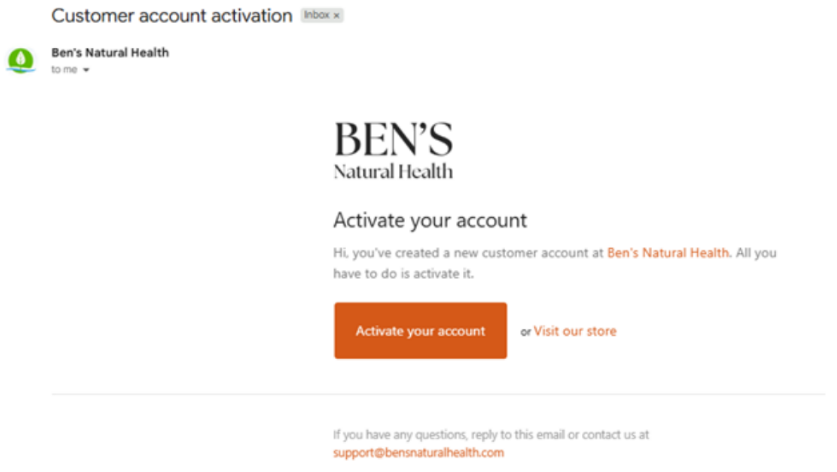
Open Your Inbox: Locate and open the official account activation email sent to you by Ben’s Natural Health.
Click the Link: Select the "Activate Your Account" link inside the body of the email.
Set Your Password: Create a secure, unique password on the page that opens.
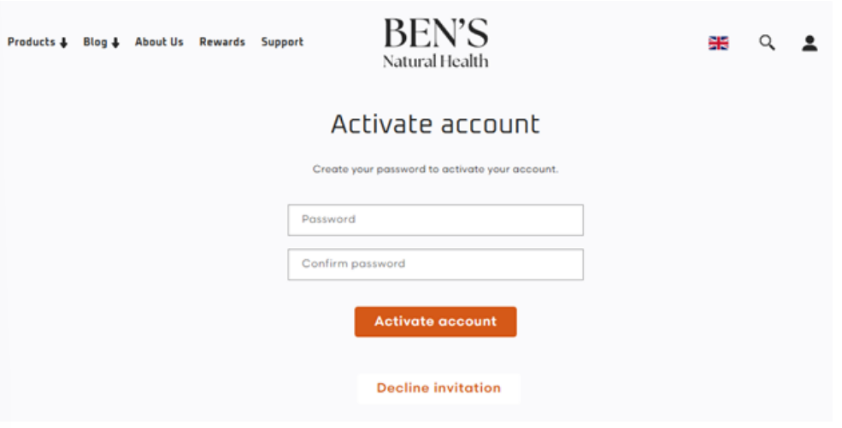
Log in to the website.Log In: Use your email address and your newly created password to log directly into the website.
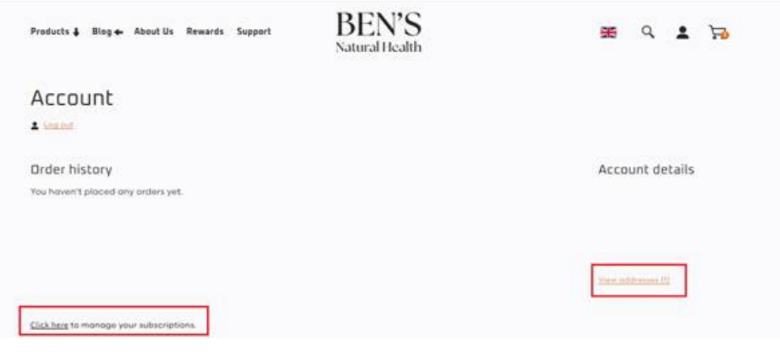
Access Your Dashboard
Once you are logged in, the system will automatically direct you to your personalized Account Dashboard. This secure hub acts as your command center for everything related to your profile.
Phase 2: Manage Your Settings
From your main Account Dashboard, you can quickly update your preferences using these two specific routes:
To Update Shipping or Billing Details: Click on the "View Addresses" button to modify or add your delivery locations.
To Adjust Recurring Shipments: Click the link that says "Click here to manage your subscriptions" to update your capsule bottle or powder pouch delivery schedules, pause shipments, or view upcoming renewals.
Didn't Receive Your Activation Email?
If you cannot find the invite link in your primary inbox or spam folder, our 100% human customer care team can manually push a fresh link straight to your screen:
Email Support: [email protected] (Subject: Need Account Activation Email)
Call Our USA Team:
1-888-868-3554| Call Our UK Team:+44-845-423-8877