.png)
I Can’t Find the Ben’s Rewards WidgetUpdated 13 days ago
If you are looking for our floating orange "Ben's Rewards" widget and it isn't appearing on your screen, please don't worry! Your points and account balance are completely safe in our backend system.
The widget is designed to float in the bottom corner of your screen on both desktop computers and mobile devices. If it is hidden, follow these simple troubleshooting steps to bring it back: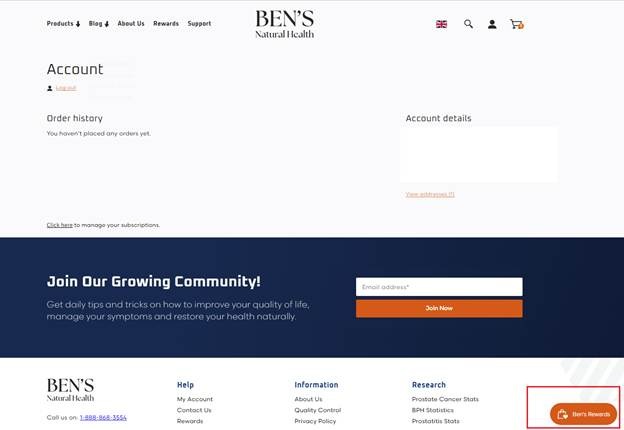
1. Make Sure You Are on the Main Storefront
The rewards widget is active across our main shopping pages. Ensure you are browsing the official site at www.bensnaturalhealth.com. If you are reading a specific external article or landing page, simply click our main logo at the top of the page to go to the home screen, and the orange widget should appear.
2. Check Your Ad-Blocker or Privacy Extensions
Because the rewards tool uses a secure third-party script to read your points balance in real time, some aggressive browser ad blockers or privacy extensions (like uBlock Origin, Brave Browser Shields, or Ghostery) can mistakenly block it.
The Fix: Try temporarily pausing your ad-blocker for our website, or add
bensnaturalhealth.comAdd your blocker's safe/allow list, then refresh the page.
3. Clear Your Browser Cache or Try Incognito
Sometimes, old website data stored by your browser can cause display glitches after a system update.
The Fix: Try opening a private or Incognito Window in your browser, then navigate to our site. If the orange widget appears there, clearing your browser’s standard cookies and cache will fix the issue permanently on your normal screens.
4. Switch Devices
If you are on a work computer or a highly secure network (like a hospital or government network), corporate firewalls may block the widget script. Try accessing our website on your personal smartphone using cellular data to see if the widget loads instantly.
Still Hidden? Our Human Team Can Manage Your Points For You!
If you have tried these steps and the orange widget still won't show its face, you do not need it to access your rewards. Our 100% human support team has direct access to the live ledger backend.
Simply contact us via phone or email, and a real person will look up your balance, generate a reward code for you manually, or apply your $10 savings voucher directly to your order in seconds:
Email Support: [email protected] (Subject line: Rewards Widget Missing)
Call Our USA Team:
1-888-868-3554Call Our UK Team:
+44-845-423-8877